


We hope your summer has been great! Today, we're sharing four updates designed to give instructors more options on how students engage, how AI fits into assignments, and how to manage deadlines.
Whether you're looking to encourage more peer-to-peer conversation, set clear expectations around AI use, get a more accurate read on how students are pacing their work, or extend deadlines for a group of students without the headache, there's something here for you.
[Now available on-demand] Join us at our free upcoming webinar with Perusall Co-founder & Chief Technology Officer, Brian Lukoff, on August 5th at 12 PM ET. He’ll walk you through all our new and latest features, including Checkpoints, Context, and Easy grouping.
💬 Required Replies & Initial Threads
One of the most common instructor requests we receive is to be able to separately require students to reply to existing conversations, start new conversations, or both. Their goal is typically to increase peer-to-peer engagement, deepen discussions, and redirect student focus from their target number of comments back to the content.
Until now, replies and original comments were graded as one and the same within the Comment content component, so a student could rack up "engagement" credit without ever responding to a classmate. Now, instructors can require a specific number of replies and/or a specific number of comments that start new conversations, and set a point deduction from the overall Comment content grade if students don't meet either threshold.
This gives you a more precise way to encourage the kind of back-and-forth and student-to-student conversation that makes comments in assignments valuable in the first place — not just a count of comments posted.
Instructors can learn more about Scoring in our PerusHall community.
🤖 AI Assessment Scale
Across higher education, some of the biggest sources of friction around AI are a lack of clarity about how assignments should be designed for the GenAI era and the absence of a shared language for communicating expectations about appropriate AI use.
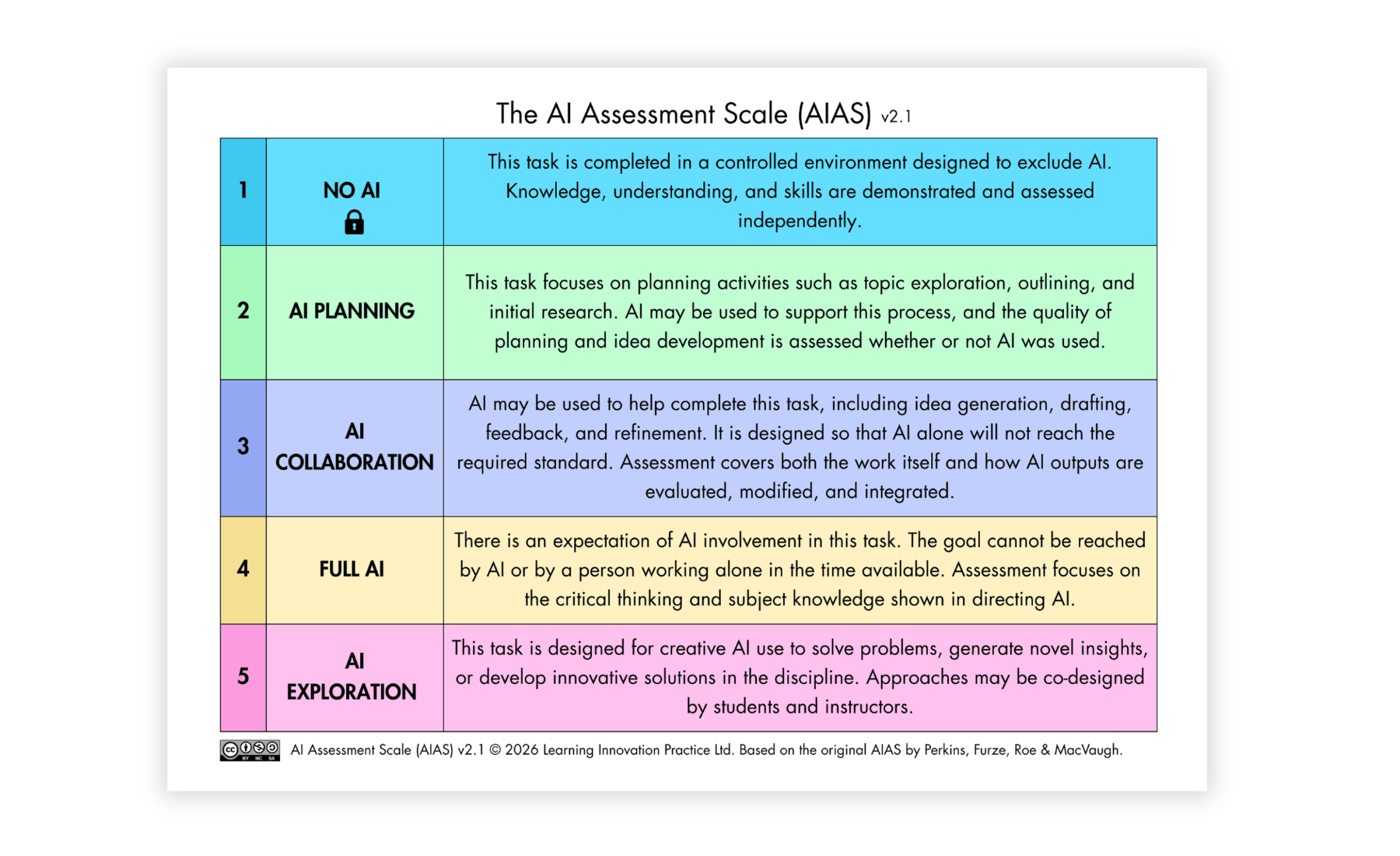
The AI Assessment Scale (AIAS) is an increasingly widely used framework that helps instructors decide what role AI should play in an assessment, design the task accordingly, and communicate clear expectations to students before they begin their work.
Instructors can now assign an AIAS level to each Perusall assignment to indicate the intended role of AI. This includes tasks completed without AI, AI-supported planning and collaboration, and tasks designed around more extensive or exploratory AI use. The levels represent different kinds of tasks rather than a progression from less AI to more AI, and no level is inherently better than another.
Perusall also allows instructors to customize the names and definitions of the levels in their course settings to reflect their own context and approach. Students see the selected level and its accompanying guidance when they open the assignment.
An AIAS level provides a clear starting point for communicating expectations, and instructors can also add assignment-specific instructions explaining what students may or must do with AI, what evidence they should provide, and how their work will be assessed.
Learn more about the AI Assessment Scale
⏱️ Open Assignment Rate Limit
Today, Perusall awards a student credit every time they open an assignment. This means if a student refreshes the page five times, they get credit for five separate sessions, even if that doesn't reflect how they actually worked.
With rate limiting, instructors can set an interval — by day, by hour, or whatever makes sense for their course — so that only one session counts per interval. For example, if you set the interval to one day and a student opens the assignment three times on Tuesday and twice on Wednesday, they'll be credited with two sessions: one for Tuesday, one for Wednesday.
This gives you a more accurate picture of how students are actually pacing and splitting up their work.
Learn more about Open Assignment Rate Limit & Scoring Information
🗓️ Updated UI for Extending Deadlines
Extending deadlines has always been possible in Perusall, but the workflow hasn't kept up with how instructors actually need to use it. Previously, you could extend a deadline for one student on one assignment at a time, or "catch up" a late-joining student by extending every deadline before they joined, but there was no easy way to do anything in between.
The updated UI makes it simple to extend deadlines across multiple students and multiple assignments at once. Whether you're accommodating a handful of students on a single assignment or making broader adjustments across your course, it takes just a few clicks instead of a series of one-off edits.
Learn more about extending deadlines

See it all at our upcoming webinar! [Now available on-demand]
Want a guided tour of everything that's new? Join us on August 5th from 12 PM ET - 1 PM ET for a live walkthrough with CTO & Co-founder Brian Lukoff. Or, if you'd rather explore on your own, all features are available in your Perusall courses today.
As always, thank you for your continued support. If you have questions or feedback, we'd love to hear from you at app.perusall.com/support.


.png)