

We hope you’ve had a great year so far! Today, we're sharing four updates designed to make Perusall more structured, more intelligent, and more secure for instructors and students alike.
Whether you're looking to deepen student engagement in video content, supercharge your work to save time, simplify group setup, or share Perusall's security credentials with your institution, there's something here for you.
[Now available on-demand] Here's a full look at what's new, and join us at our upcoming webinar with Perusall Co-founder & Chief Technology Officer, Brian Lukoff, on August 5th at 12 PM ET. Join here!
🔖 Checkpoints
One of the most common challenges in online and hybrid learning is ensuring students actually engage with the material rather than scroll past it.
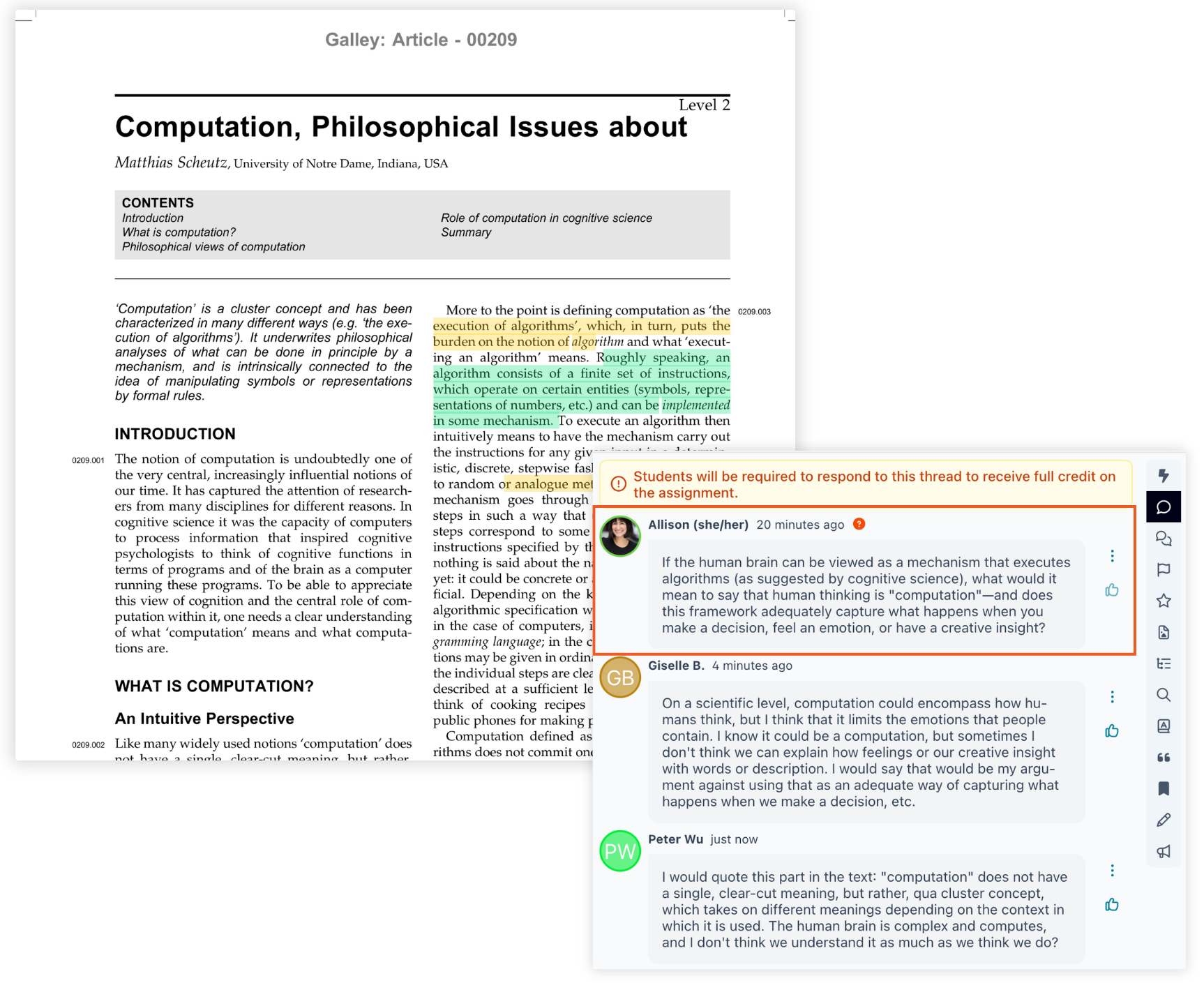
Checkpoints let you place interactive markers directly inside your Perusall assignments (in video, podcast, and text-based content) to guide students through content. Checkpoints can be used in conjunction with regular Perusall annotation and discussion. They automatically become a required part of any assignment they're added to, so students must respond to each checkpoint before they can move forward. This ensures they engage with the material deeply rather than skimming to the end.
Two types of Checkpoints
Prompt checkpoints
Ask students to respond to a discussion question before continuing. You can write your own prompts or use Perusall's AI to suggest discussion questions based on the text you've highlighted. AI prompt generation will use course context like learning objectives (see below) and other info to help propose good checkpoints.
Quiz checkpoints
Embed one or more quiz questions throughout an assignment. You can choose whether students must answer correctly or not to proceed (like regular quizzes). You can add questions manually, pull from an existing quiz in your Library, or use AI to propose a quiz from the content.
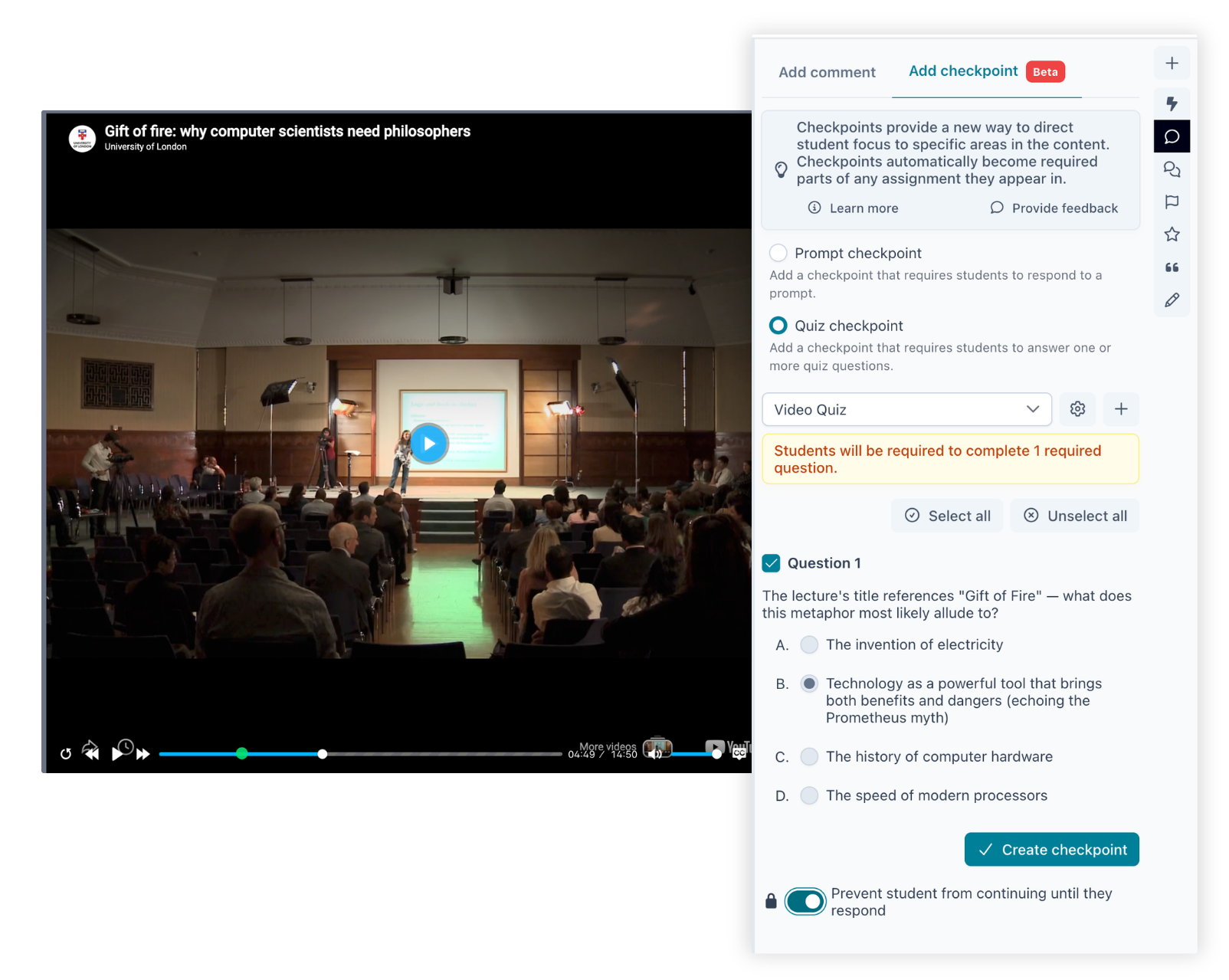
Both prompt and quiz checkpoints can be used in video and podcasts. Ask students a question mid-video or mid-podcast, and playback pauses until the student answers.
🎯 Context
You can now include learning objectives to your course to provide students with insight on what they need to succeed, giving students a clearer picture of what they’re working toward. Adding learning objectives is also helpful when using the AI discussion prompts feature to receive the best results for questions in your course.
Add in department, student level (e.g., high school, graduate, etc.), and any additional context (e.g., "My students are entering with college-level writing skills") to create your course’s learning objectives.
You can also add context at the assignment level, so students understand what specific skills or concepts they'll master with each assignment.
Learn how to add learning objectives
👥 Easy Grouping
Setting up student groups at the start of a term can be tedious, especially in large courses. Easy grouping takes care of the math for you.
Simply enter your estimated enrollment and your target group size, and Perusall will automatically calculate the number of group sets and distribute students as evenly as possible. No spreadsheets, no manual sorting.
Learn more about how groups work
🔐 SOC 2 Compliant
We're proud to announce that Perusall is now SOC 2 compliant.
.png)
SOC 2 is one of the most rigorous independent security and privacy auditing standards available. Achieving this certification means an independent auditor has verified that Perusall's systems and processes meet strict standards for security, availability, and confidentiality, and not just at a point in time, but consistently over an extended period.
For institutions with strict compliance requirements for approved software, this is big news. And for the instructors and students who use Perusall every day, it's our commitment that protecting your data is a top priority.
Read the full blog post from CTO & Co-founder Brian Lukoff
💬 Discussion Summary
In a large or highly active course, it can be hard for instructors to stay on top of everything students are discussing. Discussion summaries are designed to solve exactly that.
Available alongside the existing Confusion report, Discussion summaries are one of two new optional assignment insights you can generate directly from the assignment menu on your dashboard — giving you a quick way to gauge student understanding before class.
Discussion summaries provide a brief overview of overall student engagement, followed by themed sections that surface exemplar comments and questions. Instead of scrolling through every comment thread, you get an automatically generated summary of the conversation as a whole, plus a breakdown of the key themes students raised with real examples pulled directly from their discussion. Use this summary to help inform future lecture topics or key areas for your course.
Learn more about Discussion summaries
Additional Featurettes
Outside of our larger feature updates, we've also added a few smaller improvements worth exploring. See the full list here.
Student tour of assignments
Students now receive a dedicated walkthrough of how Standard, Peer Review, and Differentiated assignments work in Perusall, helping them get oriented faster, especially early in the term.
MHTML support for web page snapshots
When uploading a web page to your course library, Perusall now preserves the reflowable layout and accessibility features of the original page — even for longer web pages.
Automatic draft saving for annotations
When writing an annotation or comment, Perusall now automatically saves a draft as you go, giving students a safer way to work out their thoughts without losing progress.
Enhanced post reply window
The comment scoring section now offers more customizable time windows for student replies, so you can allow longer durations when it fits your course pacing.
Folder visibility controls
Instructors can now limit student-upload folders to specific students, and optionally hide those folders from everyone else in the course library.
More control over video captions
You now have finer control over captions on YouTube videos in Perusall — including reloading the player when caption status changes, and adding or updating caption files even after a video has already been added to the Library and used in an assignment.
See it all at our upcoming webinar! [Now available on-demand]
Want a guided tour of everything that's new? Join us on August 5th from 12 PM ET - 1 PM ET for a live walkthrough with CTO & Co-founder Brian Lukoff. Or, if you'd rather explore on your own, all features are available in your Perusall courses today.
As always, thank you for your continued support. If you have questions or feedback, we'd love to hear from you at support@perusall.com.
The Perusall Team

.png)